How to get more Google Maps reviews for your restaurant, the clean way
Why bought reviews get removed and can put a warning on your Google profile, what Google allows, and a simple routine that brings real reviews while you catch complaints before they go public.
Published by Qaema. General guidance. Google's policies change, so check the current versions linked below.
The short answer
Reviews come from guests who had a good meal and were asked at the right moment, with a link that takes one tap. Complaints are best caught inside the restaurant, while you can still fix them. Bought reviews, review swaps and "free dessert for five stars" all break Google's rules. They also tend to disappear, sometimes along with your good reviews.
Why bought reviews get removed
Google's Maps content policy calls this fake engagement. It removes:
- reviews that aren't based on a real experience;
- reviews posted in return for payment, discounts, free goods or services, including offers to change or remove a negative review;
- reviews posted from several accounts to push a rating up or down (Google: prohibited and restricted content, Google: Maps user-generated content policy).
Detection is automated: Google says machine learning scans contributions for suspicious activity. Since 2025 the penalty is public too. Google can stop new reviews for a while, unpublish existing ones, and show a warning on your profile saying that suspected fake reviews were removed. It rolled this out worldwide after a UK agreement in early 2025 (Search Engine Roundtable, DAC).
That warning sits on your listing where every new guest sees it, which is far worse than having fewer reviews.
What's allowed and what isn't
| Tactic | OK? | Why |
|---|---|---|
| Buying reviews or "review packages" | ✗ | Fake engagement: removed, profile can be restricted |
| A discount, a free coffee or a draw for a review | ✗ | Incentives are banned |
| Staff, family or friends reviewing you | ✗ | Not a genuine guest experience |
| Swapping reviews with the café next door | ✗ | Fake engagement |
| Asking guests with a link or a QR code | ✓ | Google suggests exactly this |
| Replying to every review, good and bad | ✓ | Google recommends it, and guests read the replies |
| Fixing a complaint, then letting the guest decide | ✓ | As long as no reward is attached |
Google itself notes that a mix of positive and negative feedback often feels more trustworthy (Google Business Profile help). A 4.6 with 300 real reviews beats a perfect 5.0 that nobody believes.
A clean routine that brings real reviews
1. Ask at the right moment
The best moment is when the guest is finishing their meal or paying, and the food is still on their mind. Don't ask at the door, before they've eaten.
2. Make it one tap
Every extra step loses people: opening Maps, searching your name, finding the button. Give them a direct link to your review page, or a QR code that opens it. Put it on the table card, the receipt and your menu.
3. Catch complaints while the guest is still there
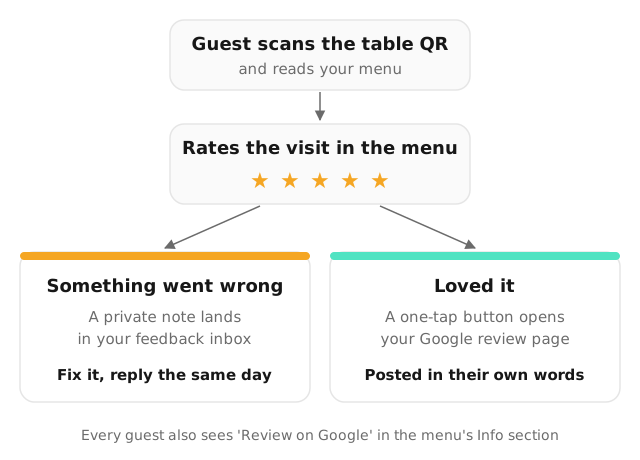
The bad reviews that hurt most come from guests who left angry and never told you. Give every guest an easy, private way to say what went wrong, such as a short rating in the menu with a comment box. A cold dish you replace on the spot rarely turns into a one-star review.
4. Reply to every review
Guests read your replies more than you think. Two short templates:
- Good review: "Thank you, Sara! Glad you liked the saffron latte. See you soon."
- Bad review: "Sorry about the wait on Friday, Khalid. We've added a second person at the counter on weekend evenings. We'd love to make it right on your next visit."
Reply within a day or two. Keep it short, never argue in public, and never ask them to change their rating in return for something.
5. Keep your profile fresh
Up-to-date hours, recent photos and a link to your menu help you show up for "near me" searches, and they make the review button easier to find.
How this works with a Qaema menu
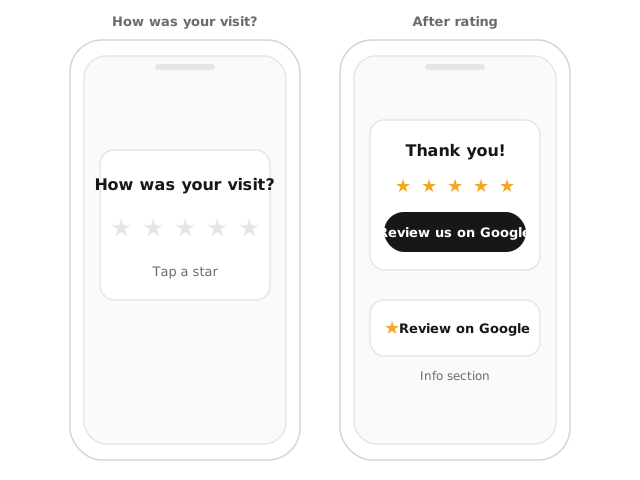
- Every menu has a "Review on Google" button in its Info section once you add your Google place in venue settings.
- Guests can rate their visit from the bottom of the menu with one tap. Low ratings ask for a short comment, which lands privately in your feedback inbox with the table number, so you can fix it during service or reply the same day.
- Guests who rate you highly see a thank-you screen with a one-tap button to your Google review page.
- Your inbox shows the numbers: average rating against the previous period, a 1–5 breakdown, unread complaints, and how many high raters went on to tap your Google link.
None of it comes with a reward, and the guest always writes their own words.
A one-page checklist
- Google Business Profile: hours, photos and menu link up to date.
- A direct review link or QR code on tables, receipts and your menu.
- A private way for guests to report problems while they're still in.
- Staff who fix a complaint on the spot, not just apologise.
- Every review replied to within two days.
- No discounts, gifts or draws tied to reviews, ever.
Qaema menus come with the rating card, the private feedback inbox and the Google review button. See pricing, or read how to pay delivery apps less.
Frequently asked questions
Can I buy Google reviews for my restaurant?
No. Google removes fake reviews and can restrict the profile: new reviews paused, existing ones unpublished, and a public warning that fake reviews were removed. Bought reviews also tend to vanish within weeks, so the money is lost too.
Can I give a discount or a free coffee for a Google review?
No. Google's policy bans offering incentives such as discounts or free items in exchange for a review, or for changing or removing a negative one.
How do I ask guests for a Google review?
Google suggests sharing a link or a QR code to your review page. Ask at the right moment (after the meal, when the bill arrives), keep it to one tap, and ask the same way every time.
How should I reply to a bad review?
Reply within a day or two, thank them, name the problem, say what you changed and invite them back. Keep it short and never argue in public.